One Sentence, Any AI Harness, Any Model: AI-Drawn Video With the North Noir CLI
You do not need a new app, an MCP connection or an API key to make your first AI-drawn video. Tell the AI coding harness you already use — with the model you already use — “Install and use the northnoir CLI to draw me a video of…”, and it installs the CLI, learns the drawing loop, writes the scene, checks its own frames and renders the film on your machine.
By Syver-August, Developer, North Noir · · 8 min read
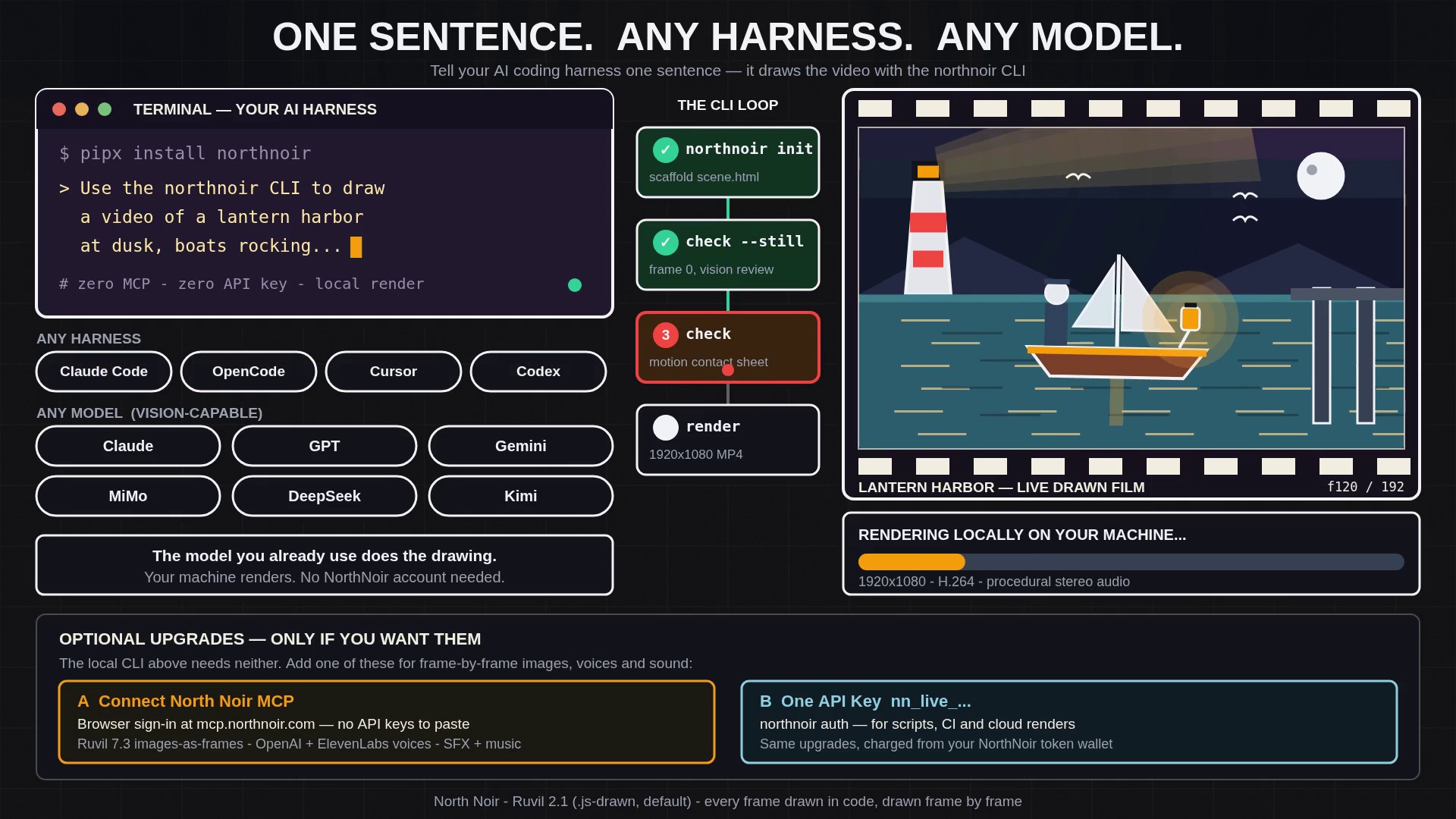
The one-sentence workflow (zero MCP, zero API key)
The whole workflow starts as a sentence in the harness you already have open: “Install and use the northnoir CLI to draw me a video of a lantern harbor at dusk.” Nothing else has to be configured first. The harness runs shell commands, writes files and looks at images — and that is everything the CLI loop needs.
- The harness installs northnoir from PyPI On your instruction the harness installs the
northnoirpackage from PyPI (pipx install northnoir, oruv tool install northnoir) and runsnorthnoir doctor --installto set up Chromium and verify ffmpeg and the pinned drawing libraries. - It installs the northnoir-draw skill
northnoir skill installcopies thenorthnoir-drawskill (SKILL.md) into the harness’s skill folders. The skill teaches thewindow.SCENEcontract, the RuvilMarks and AnidoodleDraw drawing kits, and the fix for every quality flag. - The model writes scene.html on Ruvil 2.1
northnoir initscaffolds a scene, and your model writesscene.htmlon Ruvil 2.1, the default.jsdrawing engine: a JavaScript canvas drawing program that paints every frame, drawn frame by frame at 1920×1080. - It checks the still, then the motion, with its own vision
northnoir check scene.html --stillrenders frame 0, and the model viewsframe-0000.pngwith its own vision tool and fixes composition, scale and legibility. Thennorthnoir checkrenders sampled frames and a motion contact sheet, which the model reviews frame by frame — up to 3 improvement rounds, keeping the best version. - It renders the MP4 locally
northnoir renderrenders every frame on your machine and muxes an H.264 1920×1080.mp4with procedural stereo audio. No cloud render, no account and no North Noir tokens — verify it locally and keep thescene.htmlto adjust and re-render.
That loop is the same one this article’s film was made with: the 8-second lantern-harbor video above was authored as a scene.html, still-checked, motion-checked and rendered locally by an AI coding harness. Because the scene stays as code on your disk, a small change afterwards is a small edit — describe the detail, let the model edit the drawing program, and render again without throwing the rest of the scene away. The full command reference lives on the CLI page.
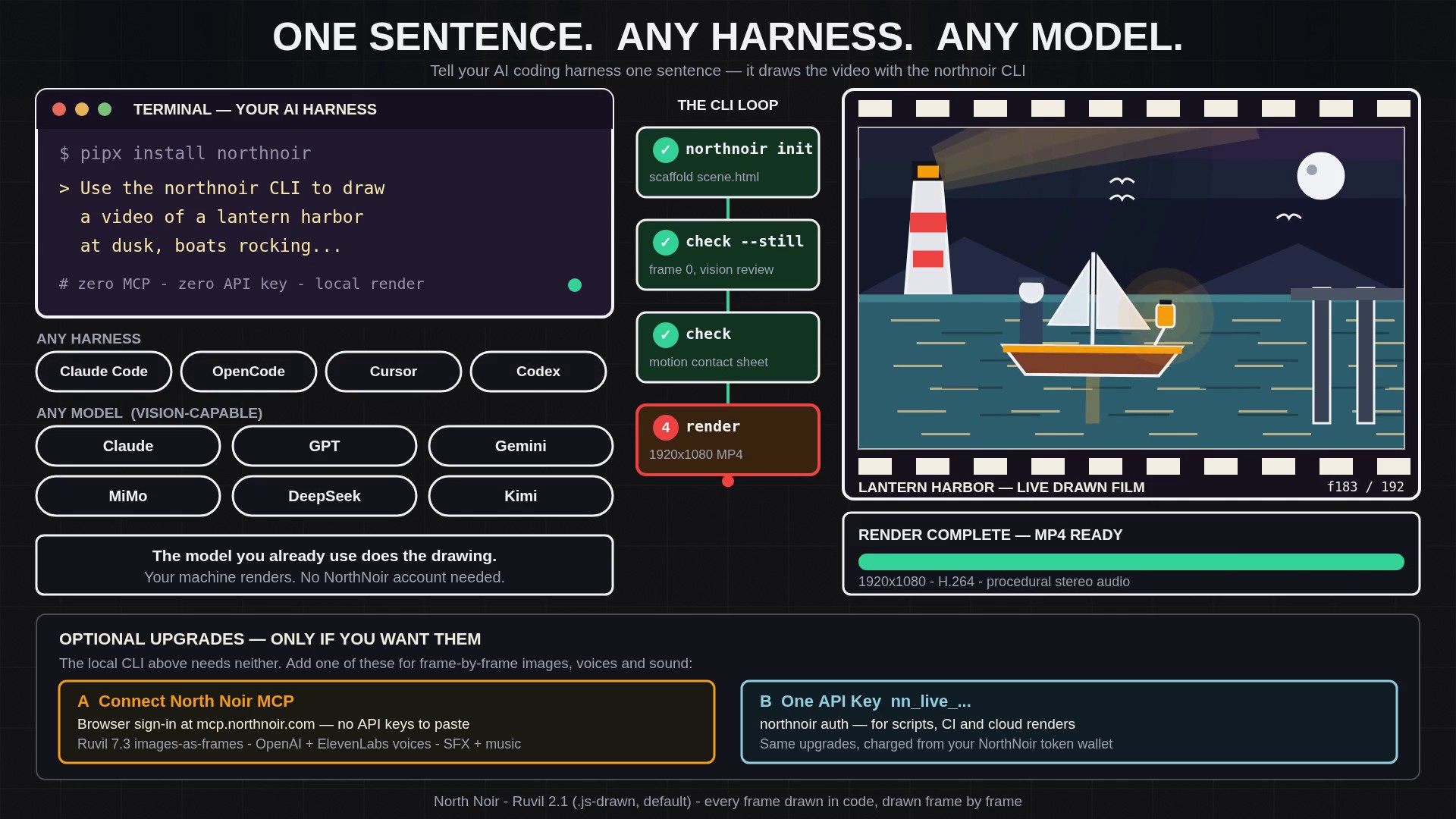
Works with every harness and every model
The CLI does not care which harness drives it, because the contract is files, shell commands and images — things every AI coding harness already does. Use Claude Code, OpenCode, Cursor, Codex, Windsurf or Cline: install the skill once, and “draw me a video of…” is enough in whichever window you already work in.
It also does not care which model does the drawing. Pair the harness with Claude, GPT, Gemini, MiMo, DeepSeek, Kimi, Muse, or any vision-capable model you already use. The model plans the scene, writes the drawing program and reviews the frames; the CLI renders deterministically, so the same scene.html produces the same film regardless of which model wrote it.
Want Ruvil 7.3 frame-by-frame images, voices and sound effects without API keys? Just connect the North Noir MCP
The local CLI is complete on its own. The upgrades begin when you want what only the connected North Noir services can provide — and the keyless way in is the MCP server. Connect your harness or chat to https://mcp.northnoir.com/mcp and sign in through the browser with OAuth: no provider API keys to create, paste or manage. The MCP page walks through the connection for each client.
Prefer a key, or need scripts and CI? Run northnoir auth nn_live_... with a single paid North Noir API key from the developer page instead. That one key drives the same connected services from the terminal and from automation, charged from your North Noir token wallet — see using the CLI with one API key for the cloud commands it unlocks.
- Ruvil 7.3, images as frames: the selectable second model, where each frame is generated as its own 2D illustration image and saved so you can inspect, download or re-roll a single frame in place.
- North Noir’s image model: stills and reference images for a production, generated through the same connection instead of a separate provider account.
- OpenAI and ElevenLabs voices: narration for the drawn sections, on its own timeline lane next to the frames.
- ElevenLabs sound effects and music: cues and beds generated and muxed under the sections, re-timeable without touching the drawings.
- North Noir’s max-reasoning LLM ladder: Gemini 4 Argon, Claude Sonnet 5.5, Muse Wonder, MiMo V2.6 Pro, GPT 6.1 Sol and Qwen3.8 Max for the planning and drawing work, chosen per run.
None of this replaces the local loop — it extends it. A film can start as one local sentence, and only the sections that need a generated frame image, a voice or a sound effect reach for the connection. And if you would rather bring your own provider keys for those pieces, the bring-your-own-key guide shows exactly what your key pays for and what North Noir still bills.
Local CLI, MCP or API key: side by side
| Local CLI Only (One sentence, zero setup) | CLI + North Noir MCP (Browser sign-in, no API keys) | CLI + North Noir API Key (nn_live_…, scripts & CI) | |
|---|---|---|---|
| Setup | One sentence in your harness; it installs northnoir from PyPI and the northnoir-draw skill | Connect the North Noir MCP server and sign in through the browser (OAuth) | Create one paid key, then run northnoir auth nn_live_... or set NORTHNOIR_API_KEY |
| Drawing engine | Ruvil 2.1 (.js-drawn): your model writes scene.html and renders locally at 1920×1080 | Ruvil 2.1 and Ruvil 7.3 (each frame generated as its own image) | Ruvil 2.1 and Ruvil 7.3, locally or with cloud generation |
| Model that draws | Any vision-capable model you already use (Claude, GPT, Gemini, MiMo, DeepSeek, Kimi, Muse) | Your connected model, or North Noir’s max-reasoning ladder (Gemini 4 Argon, Claude Sonnet 5.5, Muse Wonder, MiMo V2.6 Pro, GPT 6.1 Sol, Qwen3.8 Max) | The same ladder and services, called with your key |
| Voices, sound and images | Procedural audio coded in the scene; no generated voices or sound effects | OpenAI and ElevenLabs voices, ElevenLabs sound effects and music, and the North Noir image model | The same voices, sound effects, music and image model through the API |
| What it costs | No North Noir account or tokens for the local render; your agent or model usage is yours | North Noir plan and token wallet for connected services; no provider keys to manage | Charged from your North Noir token wallet per call |
| Best for | Your first film, experiments, and keeping scene.html in your own project | Full productions from your harness or chat without handling keys | Scripts, CI, cloud renders and repeatable automation |
Start with the first column. If a sentence in your harness can install a package, write a file, run a command and look at a picture, it can draw you a video today — and the other two columns are there, unchanged, when a production wants them. For why drawn frames are worth directing this way at all, read Why We Draw Every Frame.
Key takeaways
- One sentence — “Install and use the northnoir CLI to draw me a video of…” — is the whole setup: the harness installs northnoir from PyPI, installs the northnoir-draw skill, writes scene.html on Ruvil 2.1, vision-checks the still and the motion, and renders a 1920×1080 MP4 locally.
- The workflow runs in Claude Code, OpenCode, Cursor, Codex, Windsurf and Cline, paired with Claude, GPT, Gemini, MiMo, DeepSeek, Kimi, Muse or any vision-capable model you already use — no MCP or API key required.
- Connecting the North Noir MCP by browser sign-in (or one nn_live_… API key for scripts and CI) optionally unlocks Ruvil 7.3 images-as-frames, the image model, OpenAI and ElevenLabs voices, ElevenLabs sound effects and music, and the max-reasoning LLM ladder.
Frequently asked questions
Do I need MCP or an API key to use the North Noir CLI?
No. Tell your AI coding harness to install and use the northnoir CLI, and it installs the package from PyPI, installs the northnoir-draw skill, writes scene.html, checks the frames with its own vision and renders a 1920×1080 MP4 locally — no North Noir account, MCP connection or API key, and no North Noir tokens for the local render.
Which AI harnesses work with the northnoir CLI?
Claude Code, OpenCode, Cursor, Codex, Windsurf and Cline all work, because the CLI contract is files, shell commands and images. Install the northnoir-draw skill with northnoir skill install, then ask for a video in the harness you already use.
Which AI models can draw the video through the CLI?
Claude, GPT, Gemini, MiMo, DeepSeek, Kimi, Muse or any vision-capable model you already use. The model writes the Ruvil 2.1 drawing program and must be able to view frame 0 and the motion contact sheet to run the check-and-fix loop.
What does connecting the North Noir MCP add?
Connecting https://mcp.northnoir.com/mcp with browser OAuth sign-in unlocks what the local loop cannot provide, without pasting provider API keys: Ruvil 7.3 with each frame generated as its own image, the North Noir image model, OpenAI and ElevenLabs voices, ElevenLabs sound effects and music, and the max-reasoning LLM ladder (Gemini 4 Argon, Claude Sonnet 5.5, Muse Wonder, MiMo V2.6 Pro, GPT 6.1 Sol and Qwen3.8 Max).
When should I use a North Noir API key instead of MCP?
Use one paid nn_live_… key with northnoir auth when you need scripts, CI or cloud generation rather than an interactive sign-in. The key drives the same connected services — Ruvil 7.3 frame images, voices, sound effects, music and LLM enrichment — charged from your North Noir token wallet.
Can I edit the video after the CLI renders it?
Yes. The render comes from scene.html on your machine, so describe the detail to change and the model edits the drawing program and renders again, keeping the rest of the scene. Connected Ruvil 7.3 work also saves every frame image, so a single frame can be inspected, downloaded or re-rolled in place.
Keep reading
- Why We Draw Every Frame: The Problem With Text-to-Video, Image-to-Video, and Reference-to-Video
- AI-Drawn Video, Explained
- An AI Video Generator With Your Own API Key (BYOK)
- Software for AI-Drawn Video, and Video Made by Code (2026)
- Sound Effects Models Ranked (2026): Prices, Tests and What We Use
- Background Music Models Ranked (2026): Vocals, Instrumental and Prices
- Ruvil 2.1 Explained: AI-Drawn Video With a .js Drawing Engine
- Ruvil 7.3 Explained: Hand-Drawn Frame-by-Frame Animation With AI
- Ruvil 2.1 vs Ruvil 7.3: Which AI-Drawn Video Model Should You Use?