Ruvil 2.1 Explained: AI-Drawn Video With a .js Drawing Engine
Ruvil 2.1 is North Noir’s default AI-drawn video model. For every section of your film the AI model you choose writes a JavaScript canvas drawing program — the setting, the character, the props, the motion — and that program draws every frame at 30 fps. Then the model looks at its own frames and redraws what is wrong, across up to three review rounds. What you get back is not a sealed clip: it is a drawing you can still direct.
By Syver-August, Developer, North Noir · · 5 min read
What Ruvil 2.1 is
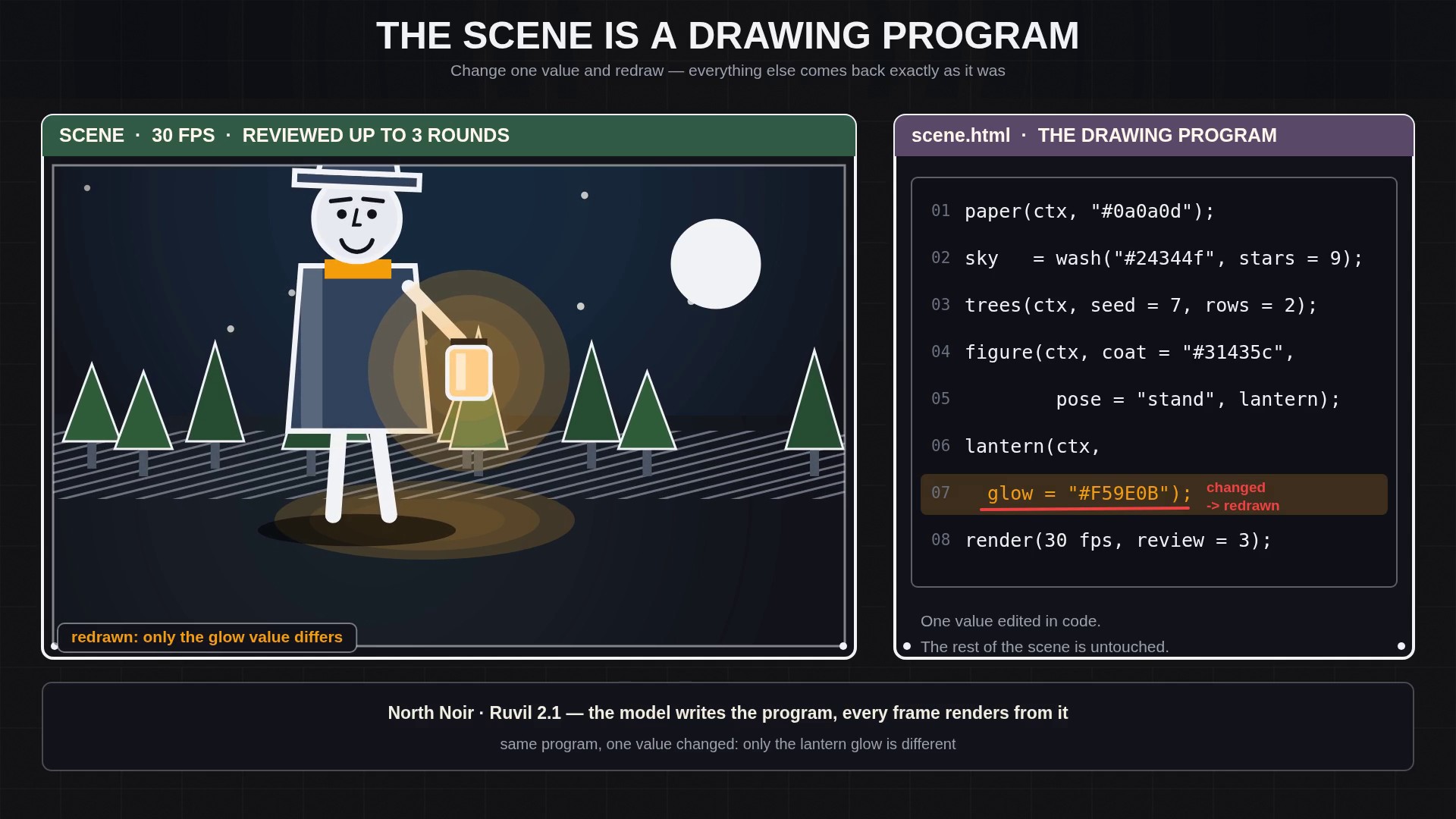
Ruvil 2.1 is the default AI-drawn video model on North Noir, and it draws in code. For each section of your film, the AI model you choose writes a JavaScript canvas drawing program: shapes and marks for the setting, a drawn figure for the subject, a timeline of poses for the motion. The drawing routines are inspired by open-source hand-drawn style kits — AnidoodleDraw’s 31 finished style plates and RuvilMarks’ paper, wash, stipple and hatch marks — so what appears on screen is drawn, mark by mark, rather than filtered from something else.
A section is a short shot — usually a few seconds of one scene. The program is that section’s source. It is what draws the picture, which means the picture can be drawn again, edited, and directed after the first version exists.
How a section is made
- Plan the section The model reads your prompt or story brief and plans what should be on screen: the setting, the subject, what moves and when.
- Write the drawing program It writes the section as a .js canvas animation — the scene, the character, the timing — in the style you picked.
- Render every frame at 30 fps The program runs once per frame, so the motion you see is drawn, not interpolated from a single still.
- Look at the frames, then redraw The model inspects its own frames the way an animator checks a lightbox and fixes what is wrong — a limb that vanishes, a colour that clashes, motion that skips.
Why code makes motion clean and deterministic
Because one program draws every frame, the picture holds together. The same routines draw the character in frame 1 and frame 90, so line style, palette and proportions do not drift the way they can when each frame is invented on its own. When the model changes the drawing code, every frame after it follows the change.
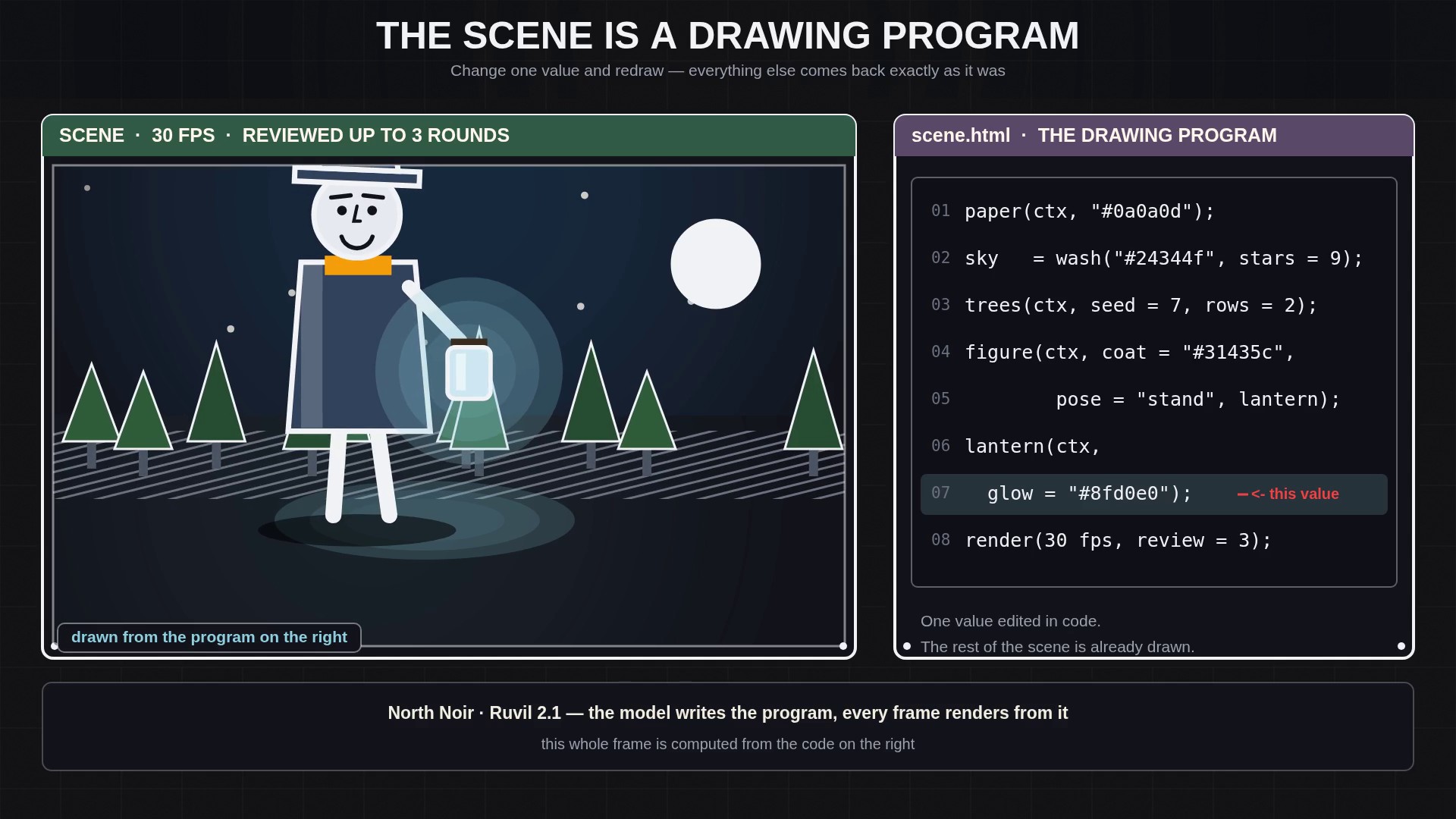
Code also makes re-runs predictable. The program is deterministic: render it again and the same frames come back. A re-run you did not mean to change is not a new gamble with the parts you already liked — and when you do change something, the change is exactly the code you changed.
Adjust: change one detail, keep the scene
This is the editing model that follows from code. When one detail is wrong — a glow that should be warmer, a hand that should move later — describe the change with Adjust. The model surgically edits that detail in the drawing code, so only what you named changes and the rest of the scene stays exactly as it was. The section is then rendered again from the revised program. That is a code edit, not a single-frame image re-roll: the frame-by-frame re-roll tool belongs to Ruvil 7.3.
Deterministic re-runs, six aspect ratios, sound
- Deterministic re-runs: the same drawing program renders the same frames again, so unchanged work stays unchanged.
- Six aspect ratios: 16:9 (Desktop), 9:16 (Phone), 1:1 (Square), 4:5 (Portrait feed), 21:9 (Cinematic) and 4:3 (Retro TV). Aspect never changes the token rate.
- Sound support: sound effects per section (off by default, coded alongside the drawings or generated as ElevenLabs cues), plus narration and music on their own lanes — mute, swap or re-time them without touching the frames.
- An editable timeline: sections arrive as clips you can cut, trim, split, reorder and re-time, and you export when the cut is right.
When to choose Ruvil 2.1
- You want a general AI-drawn video: a story, a scene, a character acting a short beat.
- You want clean, code-driven motion — consistent characters, a held line style, planned timing.
- You expect to make small creative changes and want them cheap: Adjust edits one detail without redoing the section or the film.
- You want re-runs that come back the same.
If instead you want each frame to be its own hand-drawn image — for texture, or to inspect and re-roll single frames — that is Ruvil 7.3, and the side-by-side comparison shows which one fits which job.
Key takeaways
- Ruvil 2.1 is North Noir’s default AI-drawn video model: the AI writes a .js canvas drawing program for each section, and every frame renders from it at 30 fps.
- The model inspects its own frames and redraws what is wrong across up to 3 review rounds, before the section reaches your timeline.
- Adjust surgically edits the drawing code, so only the detail you describe changes and the rest of the scene stays as it was.
- The program is deterministic, six aspect ratios are supported, and sound sits on lanes separate from the frames.
Frequently asked questions
What is Ruvil 2.1?
Ruvil 2.1 is North Noir’s default AI-drawn video model — a .js drawing engine. For each section the AI model writes a JavaScript canvas drawing program inspired by open-source hand-drawn style kits, the program renders every frame at 30 fps, and the model reviews its own frames and redraws what is wrong across up to 3 rounds.
How do I change something in a Ruvil 2.1 section?
Describe the change with Adjust. The model edits the drawing program surgically, so only that detail changes, and then renders the section again from the revised program. The rest of the scene stays as it was.
Does Ruvil 2.1 re-roll single frames?
No. Ruvil 2.1 changes a section through code: Adjust edits the drawing program and the section is rendered again. Inspecting, downloading and re-rolling single frames is Ruvil 7.3, where every frame is its own saved image.
Which aspect ratios and sound options does Ruvil 2.1 have?
Six aspect ratios: 16:9, 9:16, 1:1, 4:5, 21:9 and 4:3. Sound is supported on its own lanes: sound effects per section (off by default), plus narration and music you can mute or re-time without touching the drawn frames.
Keep reading
- Why We Draw Every Frame: The Problem With Text-to-Video, Image-to-Video, and Reference-to-Video
- Ruvil 7.3 Explained: Hand-Drawn Frame-by-Frame Animation With AI
- Ruvil 2.1 vs Ruvil 7.3: Which AI-Drawn Video Model Should You Use?
- AI-Drawn Video, Explained
- Software for AI-Drawn Video, and Video Made by Code (2026)
- An AI Video Generator With Your Own API Key (BYOK)
- Sound Effects Models Ranked (2026): Prices, Tests and What We Use
- Background Music Models Ranked (2026): Vocals, Instrumental and Prices
- One Sentence, Any AI Harness, Any Model: AI-Drawn Video With the North Noir CLI