Why We Draw Every Frame: The Problem With Text-to-Video, Image-to-Video, and Reference-to-Video
North Noir was built around a single goal: generate videos as drawn frames closer to the classical way of hand-drawn animation, giving creators control down to every section and every frame. A first generation is only a starting point. The real personality of a film comes from the small adjustments you make after you see the draft — and making a small adjustment should never destroy what already works.
By Syver-August, Developer, North Noir · · 7 min read
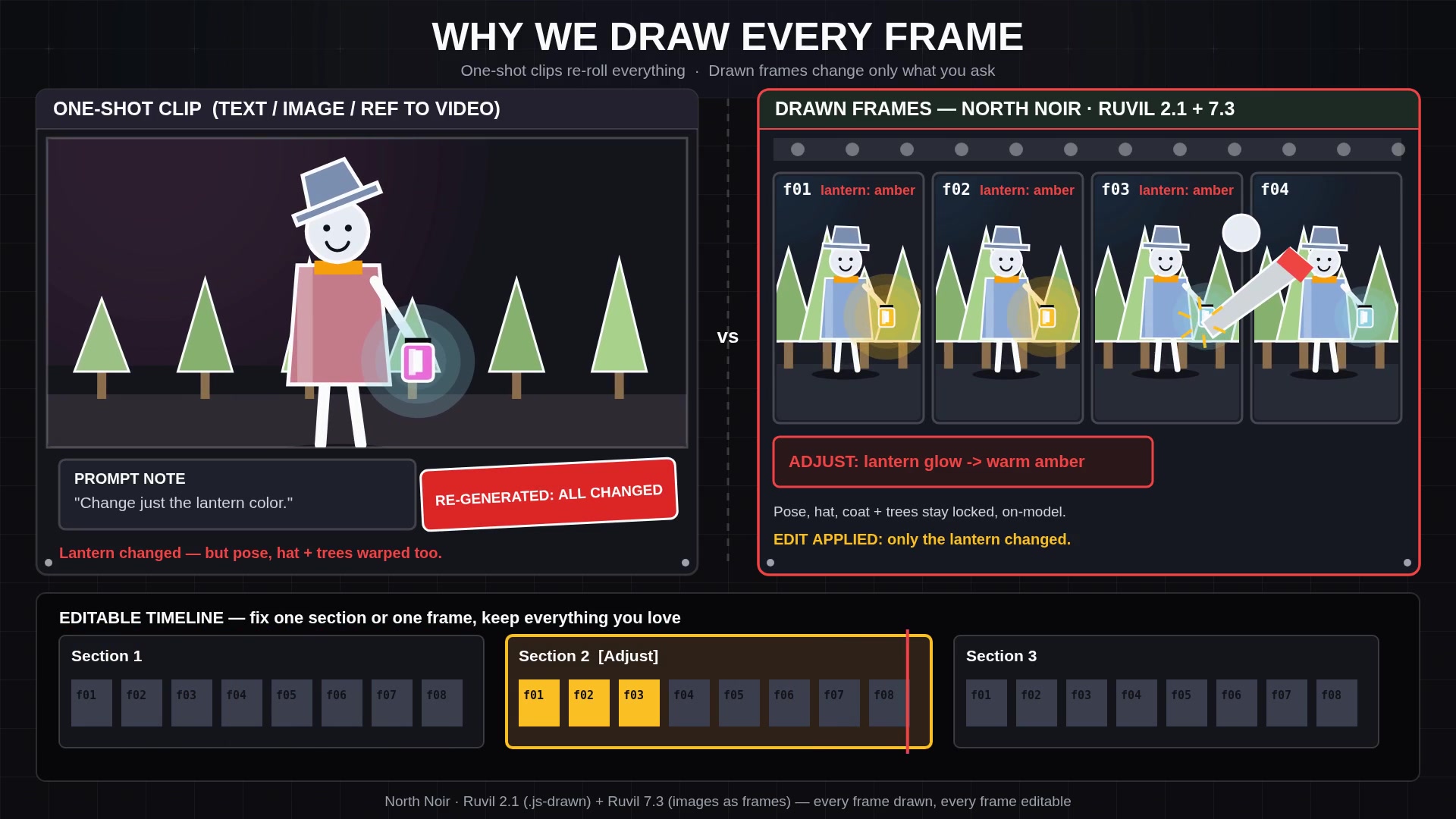
The fundamental problem with text-to-video, image-to-video, and reference-to-video
Today’s mainstream AI video tools arrive under three labels. Text-to-video begins from a written prompt. Image-to-video begins from a still frame. Reference-to-video feeds in character sheets or style frames to steer the look. Their inputs differ, but their output is identical in structure: one indivisible, baked clip. You receive a flattened grid of pixels with no memory of the staging, poses, or drawing decisions that produced it.
That architecture creates a ceiling that every filmmaker hits the moment the novelty wears off: you cannot make a small adjustment without redoing the entire video. Picture a five-second shot where 90% of the frame is right. The silhouette reads clearly, the pacing fits the voiceover, the atmosphere is what you had in your head — except a character’s hand rises a beat too early, or the lantern on the desk should burn warm amber instead of cold white. In a one-shot model, asking for that correction means re-rolling the entire clip. The model may fix the lantern, or it may alter the camera angle, rewrite the character’s expression, and lose the gesture that made the shot work in the first place. Every revision gambles with the 90% you already liked and wanted to keep as it was.
One-shot clips: roll the dice again
- Outputs one sealed clip from text, an image, or a reference
- Fixing a single detail requires regenerating the entire shot
- Every retry risks losing the framing, timing, and performance you liked
AI-drawn frames: edit the detail, keep the shot
- Built as executable drawing code or individual saved frame images
- Adjust one detail in a section, or re-roll one frame in the strip
- Preserve the 90% that works while refining the 10% that does not
Where personality and creativity actually come from
Our foundational hypothesis is straightforward: true personality and creativity come from creators being able to cheaply and easily edit small details without having to redo the entire clip. Anyone can type a prompt and accept whatever comes back on the first roll. That is not authorship; it is curation. Authorship happens in the second, third, and fourth pass — when you hold a glance three frames longer, shift a prop out of the silhouette, or quiet down a background element so the eye lands where it should.
When changing a small detail costs another full generation and threatens the rest of the scene, creators stop directing. They settle for "close enough" because the price of precision is starting over. When edits are cheap, local, and predictable, the creative loop changes completely. You try an idea because it costs almost nothing to see if it reads better. Taste lives in those small adjustments.
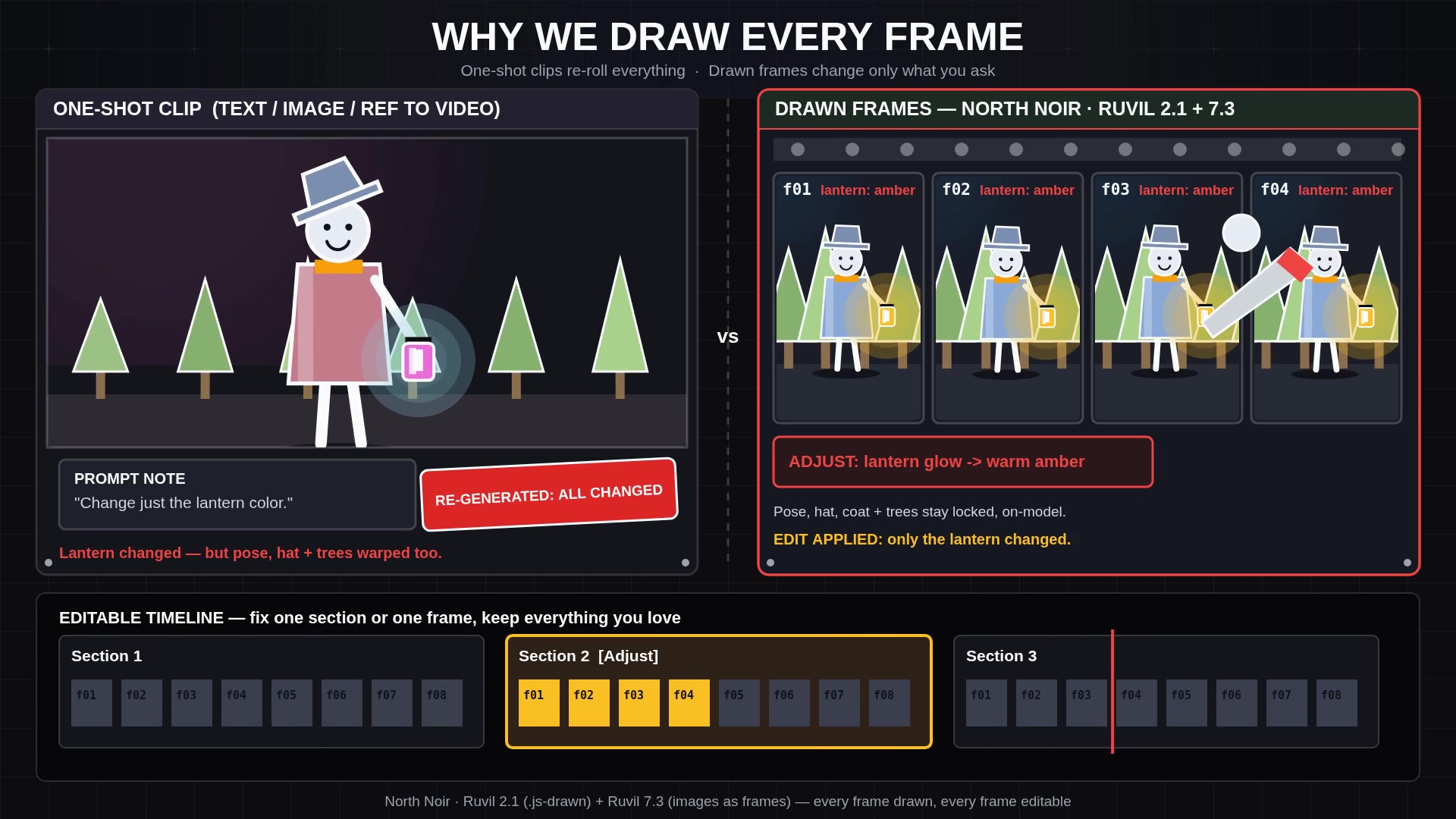
Closer to the classical way of hand-drawn animation
In classical hand-drawn animation, a shot is never an impenetrable block. Background plates sit apart from character cels; key poses define the extremes before breakdowns and in-betweens fill the motion; timing lives on an exposure sheet. If a director wants a character to hesitate before opening a door, the animator revises those specific drawings or adjusts their hold on the timeline. Neighboring frames may be smoothed so the action still flows, but the painted room, the lighting, and the surrounding performance remain intact.
North Noir brings that classical discipline to AI video. Instead of building a slot machine that outputs sealed clips, we generate videos as drawn frames that remain open to direction. Every film lands on an editable multi-track timeline where sections, voiceover, music, and sound effects sit on separate lanes — and our two drawing models give you direct access to the frames themselves.
Control down to every frame: Ruvil 2.1 and Ruvil 7.3
Ruvil 2.1 is our default model: drawn in code by AI. For every section on your timeline, the AI writes a self-contained JavaScript (.js) canvas drawing program inspired by open-source hand-drawn style kits. That program executes deterministically to render every frame at 30 fps, and the model inspects its own rendered frames across up to 3 self-review rounds to catch and fix visual defects before you even see the draft. When you want to change something — a prop’s color, a camera push, a character’s gesture — Adjust surgically edits that specific logic in the drawing code and re-renders the section, leaving the rest of the scene untouched.
Ruvil 7.3 is our selectable second model: hand-drawn frame-by-frame images as frames. When you choose Ruvil 7.3, the engine plans the shot with classical hand-drawn animation timing — key poses, anticipation, ease-in and ease-out breakdowns, and secondary motion — and generates each frame as its own 2D illustration image. Every frame is saved directly to the section frame strip in the Studio, where you can inspect each drawing, download it, or re-roll a single frame in place without disturbing the rest of the sequence.
- Generate the first pass Describe your story or section in the Studio. Use Ruvil 2.1 by default for 30 fps code-drawn scenes, or select Ruvil 7.3 for frame-by-frame 2D illustration images.
- Edit the detail that matters Keep the 90% you like. Use Adjust on a Ruvil 2.1 section to surgically modify a pose, prop, or timing beat in code, or open the Ruvil 7.3 frame strip to re-roll a single frame in place.
- Cut and score on the timeline Trim, reorder, and time your sections alongside narration, music, and sound effects until the cut carries your exact rhythm.
That is why we draw every frame. The future of AI video is not a longer one-shot clip you still cannot edit; it is a medium you can actually direct. To see how the pipeline works under the hood, read AI-Drawn Video, Explained, or learn more about our studio and mission on the About page.
Key takeaways
- Text-to-video, image-to-video, and reference-to-video generate indivisible baked clips — fixing one small detail forces a whole-clip regeneration that risks the 90% you liked.
- True personality and creativity come from being able to cheaply and easily edit small details without redoing the entire video.
- Ruvil 2.1 (default) writes a
.jscanvas drawing program per section at 30 fps with up to 3 self-review rounds, letting Adjust edit one detail in code while locking the rest of the scene. - Ruvil 7.3 (selectable) generates hand-drawn frame-by-frame 2D illustration images as frames, saved to a frame strip where you can inspect, download, or re-roll any single frame in place.
Frequently asked questions
What is the fundamental problem with text-to-video, image-to-video, and reference-to-video?
All three generate a shot as one baked clip. Because the model outputs flattened video rather than editable scenes or individual frame drawings, you cannot adjust a small detail — a pose, a prop, or a timing beat — without regenerating the entire clip and gambling with the parts you wanted to keep.
Why does North Noir focus on cheap, small edits?
Because a first draft is never the finished film. Our hypothesis is that true personality and creativity come from cheaply and easily editing small details after the first pass. When small refinements are safe and fast, creators can actually direct their work instead of settling for lucky rolls.
How does Ruvil 2.1 keep the rest of a scene locked when I make an edit?
Ruvil 2.1 is our default .js drawing engine: it writes a JavaScript canvas program for each section, renders every frame at 30 fps, and checks its own work across up to 3 self-review rounds. When you describe a change with Adjust, the AI surgically edits only the relevant code in that program and re-renders the section.
How does Ruvil 7.3 differ from Ruvil 2.1?
While Ruvil 2.1 draws in JavaScript code at 30 fps, Ruvil 7.3 is a selectable model that generates each frame as its own 2D illustration image with classical hand-drawn animation timing. Every frame is saved to the section frame strip so you can inspect, download, or re-roll a single frame in place.
Keep reading
- AI-Drawn Video, Explained
- Software for AI-Drawn Video, and Video Made by Code (2026)
- An AI Video Generator With Your Own API Key (BYOK)
- Sound Effects Models Ranked (2026): Prices, Tests and What We Use
- Background Music Models Ranked (2026): Vocals, Instrumental and Prices
- Ruvil 2.1 Explained: AI-Drawn Video With a .js Drawing Engine
- Ruvil 7.3 Explained: Hand-Drawn Frame-by-Frame Animation With AI
- Ruvil 2.1 vs Ruvil 7.3: Which AI-Drawn Video Model Should You Use?
- One Sentence, Any AI Harness, Any Model: AI-Drawn Video With the North Noir CLI